
Automate Shopify preorder partial payments with 9 Pre-Built Flow Templates
Downpay's most commonly used pre-built automation workflows for deposits and partial payments are now available in the Shopify Flow template library.
Install Shopify deposit workflows from inside Flow
Shopify Flow is one of the most powerful tools available to merchants. Along with an API-first approach, it's always been central to how Downpay handles automation.
Now nine of Downpay's most commonly used pre-built workflows are available directly in the Shopify Flow template library, so install only takes a few clicks.
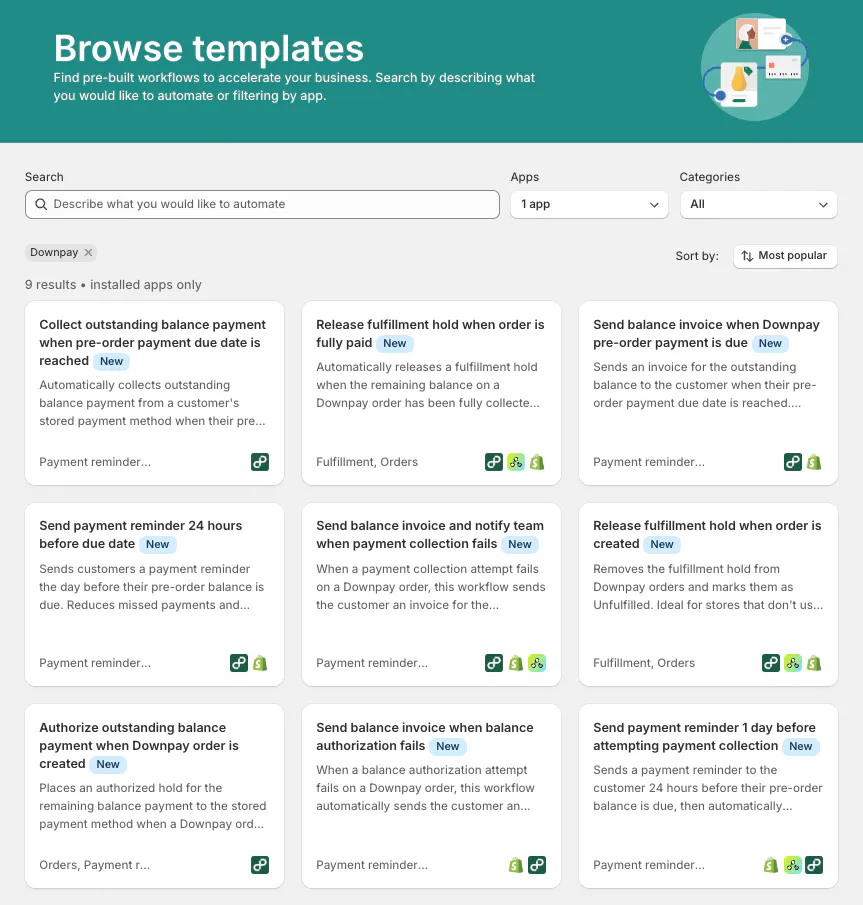
What do Downpay's pre-built workflows enable?
The templates cover the core scenarios that come up when selling with deposits or deferred payments on Shopify, including:
- Collecting the outstanding balance automatically when a pre-order payment due date is reached
- Authorizing the outstanding balance when a Downpay order is first created
- Sending a balance invoice to the customer when a payment due date arrives, when collection fails, or when authorization fails
- Sending a payment reminder 24 hours before the balance is due
Merchants can install and modify any of them to fit their specific fulfillment and communication workflows.
How do I install the templates?
To browse the full set of pre-built partial payment workflows:
- Open Shopify Flow from your admin
- Select Browse templates.
- Select Downpay from the Apps dropdown.
You can then click on a template to preview it before installing.
- A full reference to Downpay's triggers, actions, and workflows is available on Downpay's documentation site.
FAQ
Does Shopify Flow work with deposits and partial payments? Yes. Downpay integrates directly with Shopify Flow, giving merchants access to triggers and actions built specifically for deposit and partial payment workflows; including balance collection, authorization, payment reminders, and failed payment recovery.
Do I need to know how to code to use these Flow templates? No. The templates install in a few clicks from the Shopify Flow template library. You can use them as-is or customize them to fit your store's fulfillment and communication workflows without writing any code.
Which Shopify plans support Shopify Flow? Shopify Flow is available on all Shopify plans. You do not need to be on Shopify Plus to use Downpay's Flow templates.
What happens if a customer's balance payment fails? Downpay's Flow templates include a workflow that automatically sends the customer a balance invoice when payment collection fails, so you don't have to follow up manually.
Can I customize the templates after installing them? Yes. Each template is a starting point. You can modify the triggers, conditions, and actions inside Shopify Flow to match your specific fulfillment process or customer communication preferences.